
For Philippine public school teachers
Lesson plans that already know the curriculum.
Hubmatch drafts MATATAG lesson plans. Pick your competencies from the guide and it writes the first draft around them — you edit what you want to change, then export a formatted Word file.
- 7,118
- Competencies built in
- 126
- Learning areas
- 1–12
- Grade levels
- 4
- Quarters each
The competencies are already there
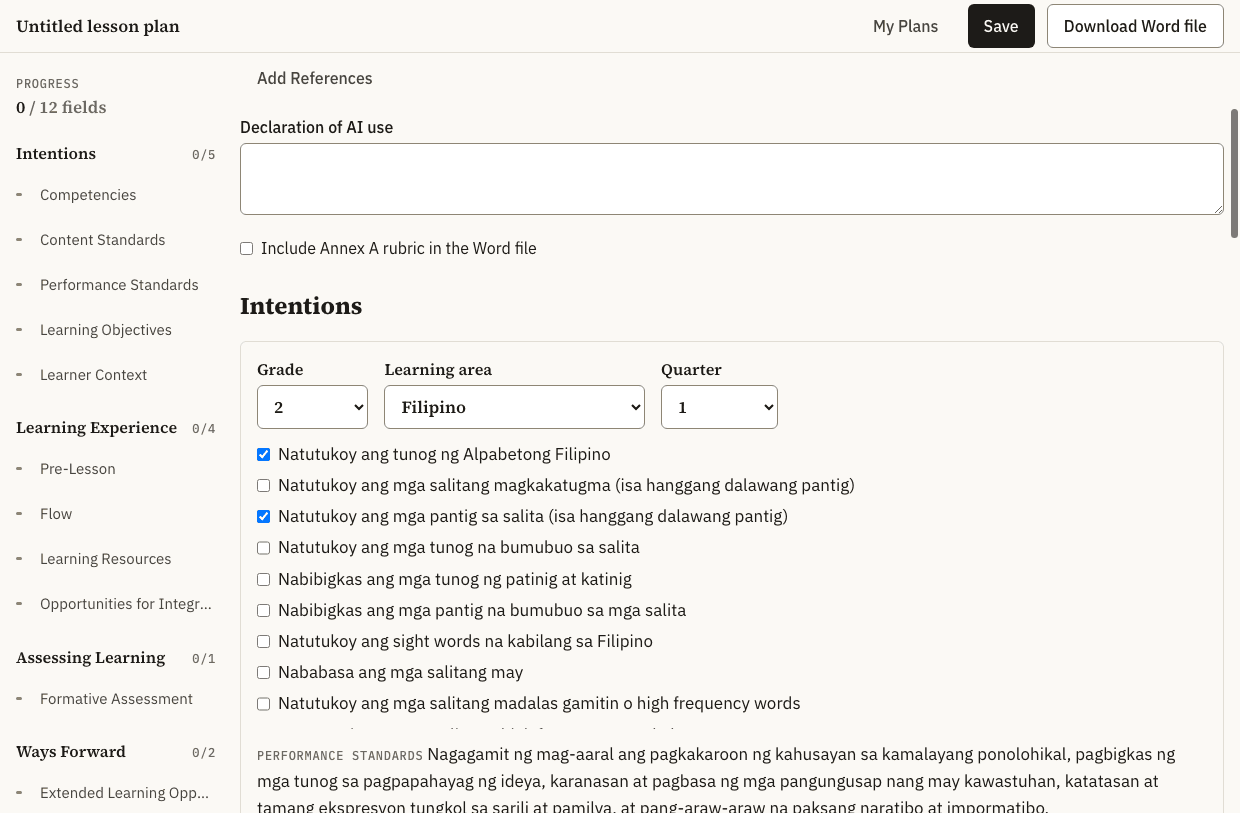
Choose a grade, learning area and quarter. What appears is the wording from the curriculum guide — tick what your lesson covers and it goes into the plan, with the quarter’s standards attached.
Four things that take the longest, handled
Pick, don’t retype
Choose your grade, learning area and quarter. The competencies appear exactly as the MATATAG guide prints them — with their content and performance standards attached.
Write with the prompts beside you
Each field carries the guidance for what it asks for, so you are not switching between the form and a memo to remember what belongs where.
Export a Word file
One click produces a formatted .docx in the expected layout — ready to print, submit, or hand to a school head for review. The layout follows the ILAW format, the standard structure your division expects a lesson plan to follow.
School Forms 2, 4 and 9
Mark who is absent a day at a time, then export the month’s attendance register and the movement report in their official layouts — per-day totals, averages, percentages and the cumulative columns all computed. Enter term grades — or, for Grade 1, write the term reports the form asks for — and each learner’s report card comes out of the same records, for Grades 1 to 6. It uses no AI, so it costs nothing.
What’s in the library today
Every competency is transcribed from the published MATATAG curriculum guides and checked against the printed page. More learning areas are being added.
| Learning area | Grades | Competencies |
|---|---|---|
| English | Grades 2–10 | 668 |
| Mathematics | Grades 1–10 | 506 |
| Filipino | Grades 2–10 | 506 |
| Science | Grades 3–10 | 324 |
| EPP/TLE | Grades 4–8 | 230 |
| Araling Panlipunan | Grades 4–10 | 166 |
| GMRC | Grades 1–6 | 152 |
| Music and Arts | Grades 4–10 | 113 |
| Physical Education and Health | Grades 4–10 | 111 |
| Values Education | Grades 7–10 | 107 |
| Tourism Services | Grades 9–12 | 104 |
| Computer Systems Servicing | Grades 9–12 | 100 |
| Computer Programming (.NET Technology) | Grades 11–12 | 100 |
| Hotel Services | Grades 9–10 | 84 |
| Language | Grade 1 | 80 |
| Fish Capture | Grades 9–12 | 80 |
| Reading and Literacy | Grade 1 | 77 |
| Computer Programming | Grades 9–10 | 76 |
| Food Preparation | Grades 9–10 | 72 |
| General Mathematics | Grade 11 | 69 |
| Animal Production | Grades 9–10 | 68 |
| Residential Carpentry | Grades 9–10 | 68 |
| Handicrafts | Grades 9–10 | 64 |
| Ships Catering Services | Grades 11–12 | 64 |
| Finite Mathematics 2 | Grades 11–12 | 64 |
| Finite Mathematics 1 | Grades 11–12 | 62 |
| Beauty Care Services | Grades 9–10 | 56 |
| Food Service | Grades 9–10 | 56 |
| Shielded Metal Arc Welding (SMAW) | Grades 9–10 | 56 |
| Electronics Product Assembly and Servicing | Grades 11–12 | 56 |
| Marine Transportation at the Support Level | Grades 11–12 | 54 |
| Visual Arts | Grades 9–10 | 52 |
| Aquaculture (Fish Culture) | Grades 9–10 | 52 |
| Agricultural Crop Production | Grades 9–10 | 52 |
| Residential Plumbing | Grades 9–10 | 52 |
| Hairdressing | Grades 11–12 | 52 |
| Malikhaing Pagsulat | Grades 11–12 | 50 |
| Computer Programming (Oracle Database) | Grades 11–12 | 50 |
| Telecommunications | Grades 9–10 | 48 |
| Residential Masonry and Tile Setting | Grades 9–10 | 48 |
| Computer Programming (Java) | Grades 11–12 | 48 |
| Marine Engineering at the Support Level | Grades 11–12 | 48 |
| Manual Metal Arc Welding | Grades 11–12 | 48 |
| Food and Beverage Operation | Grades 11–12 | 46 |
| General Science | Grade 11 | 45 |
| Effective Communication | Grade 11 | 45 |
| Mabisang Komunikasyon | Grade 11 | 45 |
| Food and Beverage Processing | Grades 9–10 | 44 |
| Garments Artisanry | Grades 11–12 | 44 |
| Contemporary Literature 2 | Grades 11–12 | 42 |
| Motorcycle and Small Engine Servicing | Grades 11–12 | 42 |
| Makabansa | Grades 1–3 | 40 |
| Garments | Grades 9–10 | 40 |
| Health and Wellness Massage | Grades 9–10 | 40 |
| Automotive and Small Engine Servicing | Grades 9–10 | 40 |
| Technical Drafting | Grades 11–12 | 40 |
| Contemporary Literature 1 | Grades 11–12 | 40 |
| Illustration | Grades 11–12 | 40 |
| Caregiving (Adult Care) | Grades 11–12 | 38 |
| Agricultural Crops Production | Grades 11–12 | 38 |
| Broadband Installation | Grades 11–12 | 38 |
| Hotel Operation (Housekeeping Services) | Grades 11–12 | 38 |
| Wika at Komunikasyon sa Akademikong Filipino | Grades 11–12 | 36 |
| Construction Operation | Grades 11–12 | 36 |
| Events Management Services | Grades 11–12 | 36 |
| Caregiving (Child Care) | Grades 11–12 | 36 |
| Aesthetic Services (Beauty Care) | Grades 11–12 | 34 |
| Carpentry | Grades 11–12 | 34 |
| Electrical and Electronics Servicing | Grades 9–10 | 32 |
| Electrical Installation and Maintenance | Grades 11–12 | 32 |
| Poultry Production (Chicken) | Grades 11–12 | 32 |
| Agro-Entrepreneurship | Grades 11–12 | 32 |
| Handicrafts (Weaving) | Grades 11–12 | 32 |
| Business 3 (Business Economics) | Grades 11–12 | 32 |
| Ruminants Production | Grades 11–12 | 32 |
| Visual Graphic Design | Grades 11–12 | 32 |
| Kitchen Operations | Grades 11–12 | 30 |
| Swine Production | Grades 11–12 | 30 |
| Aquaculture | Grades 11–12 | 30 |
| Business 2 (Business Finance and Income Taxation) | Grades 11–12 | 30 |
| Bakery Operations | Grades 11–12 | 30 |
| Food Processing | Grades 11–12 | 28 |
| Citizenship and Civic Engagement | Grades 11–12 | 28 |
| Social Sciences (Theory and Practice) | Grades 11–12 | 26 |
| Contemporary Marketing | Grades 11–12 | 26 |
| Contact Center Services | Grades 11–12 | 26 |
| Hotel Operation (Front Office Services) | Grades 11–12 | 24 |
| Photovoltaic Systems Installation | Grades 11–12 | 24 |
| Animation | Grades 11–12 | 24 |
| Chemistry 1 | Grade 11 | 23 |
| Creative Composition 1 | Grade 11 | 22 |
| Physics 1 | Grade 11 | 21 |
| Organic Agriculture Production | Grades 11–12 | 20 |
| Philippine Governance (Philippine Politics and Governance) | Grades 11–12 | 20 |
| Biology 1 | Grade 11 | 20 |
| Mechatronics | Grades 11–12 | 20 |
| Pag-aaral ng Kasaysayan at Lipunang Pilipino | Grade 11 | 19 |
| Earth and Space Science 2 | Grade 11 | 19 |
| Creative Composition 2 | Grade 11 | 19 |
| Earth and Space Science 1 | Grade 11 | 18 |
| Automotive Servicing (Electrical Repair) | Grade 12 | 18 |
| Domestic Refrigeration and Air-Conditioning Servicing | Grades 11–12 | 18 |
| Physics 2 | Grade 11 | 17 |
| Automotive Servicing (Engine and Chassis Repairs) | Grade 12 | 16 |
| Physical Education 1 (Fitness and Recreation) | Grades 11–12 | 16 |
| Physical Education 2 (Sports and Dance) | Grades 11–12 | 16 |
| Biology 2 | Grade 11 | 15 |
| Chemistry 2 | Grade 11 | 15 |
| Filipino sa Larang Teknikal-Propesyonal | Grade 12 | 14 |
| Sports Activity Management | Grades 11–12 | 14 |
| Life and Career Skills | Grade 11 | 13 |
| Filipino sa Sining at Disenyo | Grade 12 | 13 |
| Filipino sa Isports | Grade 12 | 12 |
| Business 1 (Basic Accounting) | Grade 11 | 11 |
| Introduction to Organization and Management | Grade 11 | 11 |
| Entrepreneurship | Grade 12 | 10 |
| Filipino Identity Through the Arts | Grade 11 | 10 |
| Arts 2 (Creative Industries: Music, Dance and Theater) | Grade 11 | 9 |
| Arts 1 (Creative Industries: Visual, Literary, Media, Applied and Traditional Art) | Grade 11 | 8 |
| Sports Coaching | Grade 11 | 8 |
| Commercial Air-Conditioning (Installation and Servicing) | Grade 12 | 6 |
| Human Movement 1 (Basic Anatomy in Sports and Exercise) | Grade 11 | 6 |
| Sports Officiating | Grade 11 | 6 |
| Human Movement 2 (Motor Skills Development) | Grade 11 | 5 |
| Leadership and Management in the Arts | Grade 11 | 5 |
| Introduction to Philosophy | Grade 11 | 3 |
| Total | 7,118 |
Built for the reporting rules
The AI-use declaration is part of the plan
DepEd Order No. 016, s. 2026 asks teachers to state how AI was used in preparing a lesson plan. Hubmatch carries that field in the document itself and defaults to “No AI assistance was used,” so the declaration is answered honestly whether or not you use any assistance at all.
- The declaration field is exported with the plan, not bolted on after
- Your drafts stay in your browser; only what a draft needs is sent, and only when you ask for one
- Curriculum text is transcribed verbatim, never paraphrased or generated
Questions worth answering plainly
- Where does my lesson plan go?
- It stays in your browser on the device you wrote it on — no server keeps a copy, and it is not backed up either, so download the Word file for anything you need to keep. The one exception is AI help: when you ask for a draft, or press Polish, Translate or Tidy, that field’s text is sent to be processed and is not stored. Learner Context is never sent.
- Do I need an account?
- Yes — sign in with Google, which takes a moment and needs no password to remember. It is what keeps your AI plan credits attached to you. Your lesson plans still stay in your browser, not in an account.
- Is this an official DepEd system?
- No. Hubmatch is an independent tool. It uses the publicly published MATATAG curriculum guides, but it is not affiliated with or endorsed by the Department of Education, and it is not a substitute for anything your school or division requires.
- What if the curriculum text looks wrong?
- The printed guide governs, always. Competencies are transcribed from the published PDFs and checked page by page, but if what you see here differs from your copy of the guide, trust the guide and please report it.
- Does it write the lesson plan for me?
- It writes the first draft. You review, edit, and sign it — the judgment stays yours, and the plan carries a declaration of what was drafted. Curriculum text is never drafted: competencies and standards are transcribed word for word from the DepEd guide.
- Which learning areas are covered?
- 126 so far, listed in the table above, across grades 1–12. The rest of the MATATAG guides are being added; if yours is missing it is not finished yet, not excluded.
- Does this page track me?
- This page — the one you are reading — uses Google Analytics to count visits, which sets a cookie and tells Google the page you viewed and roughly where you are. The editor does not: once you start writing, there is no analytics script on the page at all, so nothing about your lesson plan, your learners, or your school is ever seen by it.
Open it and start writing.
Nothing to install. Sign in with Google, pick a grade, and the curriculum is already there.
Start a lesson plan